-
LatestThe best Speaker of 2026
-
 Ultimate Ears Megaboom 4 Rugged speaker with 360° sound and deep bass.
-
 Ultimate Ears Boom 4 Portable speaker: 360° sound, durable, perfect for adventures.
-
 Ultimate Ears Wonderboom 4 Portable speaker with style, durability, and great sound.
-
 Turtlebox Ranger Rugged outdoor speaker with powerful, clear sound.
-
 House of Marley Get Together 3 Eco-friendly speaker with rich sound and stylish design.
-
 Turtlebox Original Gen 3 Rugged, portable speaker with powerful sound and durability.
-
-
LatestThe best Speaker of 2026
-
 Onkyo GX-10DB Compact speakers with premium sound and versatile connectivity.
-
 Onkyo GX-30ARC Compact speakers delivering impressive sound and sleek design.
-
 Audioengine HD6 HiFi speakers for rich sound and seamless connectivity.
-
 Mackie CR8BT Premium sound quality with Bluetooth convenience.
-
 Mackie CR5BT Affordable studio monitors with Bluetooth connectivity, great sound.
-
 KEF LSX II LT Compact powered speakers with streaming and HDMI ARC
-
-
LatestThe best Speaker of 2026
-
 Yamaha NS-F 51 Smooth, affordable floorstanders for music and movie nights
-
 Q Acoustics 5040 Floorstanders deliver clear vocals, controlled bass, spacious sound.
-
 Q Acoustics 3050i Hifi Warm, room-filling floorstanders for music and movie nights.
-
 Q Acoustics M40 Room-filling stereo sound with simple all-in-one connectivity.
-
 Polk Audio T50 Warm, affordable towers for music and home theater
-
 KEF Q550 Slim towers, clear vocals, spacious imaging, controlled bass.
-
-
LatestThe best Speaker of 2026
-
 Logitech Z207 2.0 Affordable PC speakers with versatile connectivity options.
-
 Edifier G2000 Compact speakers with powerful sound, perfect for desks.
-
 Edifier R1855DB Fuller desktop sound with flexible wired and wireless connectivity.
-
 Edifier R1280T Affordable powered speakers offer warm, clear everyday sound.
-
 Audioengine A2+ Compact powered speakers deliver clear, flexible desktop sound.
-
 Logitech Z313 Compact 2.1 desktop speakers deliver fuller everyday audio.
-
-
LatestThe best Headphone of 2026
-
 Sony 1000X THE COLLEXION Zwart Sleek headphones with immersive sound and adaptive noise cancellation.
-
 Bose QuietComfort Ultra Headphones (Gen 2) Immersive sound, top-notch noise cancellation, ultimate comfort.
-
 Sony WH-1000XM6 High-performance headphones with exceptional sound and features.
-
 JBL Tour One M3 Smart TX Premium noise-cancelling headphones with a travel-ready audio transmitter
-
 Cleer Audio Enduro ANC Affordable headphones with cancellation and marathon battery life
-
 Cleer Audio Alpha Detailed sound, strong noise cancellation, and all-day battery life.
-
-
LatestThe best Headphone of 2026
-
 Jabra Evolve 20SE UC Stereo Lightweight wired headset for clear everyday office calls
-
 Jabra Evolve 40 UC Wired headset delivers clear calls and convenient controls
-
 Philips TAH4205 Compact wireless headphones with punchy bass and quick charging
-
 Jabra Evolve2 65 Flex MS Foldable Teams headset for clear, portable hybrid-work calls.
-
 JBL JR310BT Kid-friendly wireless audio with an 85 dB limit
-
 Sony WH-CH520 Lightweight headphones, long battery life, effortless pairing.
-
-
LatestThe best Headphone of 2026
-
 Cleer Audio ARC 3 Open-ear comfort, rich features, everyday awareness.
-
 Samsung Buds FE Affordable everyday earbuds with ANC and a secure fit
-
 Sennheiser Momentum Sport Workout earbuds with heart-rate tracking and punchy sound
-
 Sony LinkBuds Fit Comfortable, secure earbuds for commutes and workouts.
-
 JBL Live Buds 3 Feature-rich earbuds with touchscreen case and customizable sound.
-
 Bowers & Wilkins Pi8 Premium earbuds offer detailed sound and travel-ready versatility
-
-
LatestThe best Headphone of 2026
-
 HyperX Cloud Alpha Wireless Wireless headphones: immersive sound, long-lasting battery life.
-
 Razer Kraken V4 Immersive gaming headset with comfort and sound quality.
-
 Turtle Beach Stealth 700 GEN3 Flexible gaming audio, Bluetooth, and exceptional battery endurance.
-
 Logitech G535 Lightspeed Wireless Lightweight comfort and reliable PC, PlayStation gaming audio
-
 Corsair Void RGB Elite Wireless Comfortable PC gaming headset with punchy audio
-
 Corsair HS80 RGB Wireless Comfortable gaming headset with clear audio and microphone
-
-
LatestThe best Home audio system of 2026
-
 Sony Bravia Theatre Bar 8 Premium Dolby Atmos sound with a tidy, expandable single-bar design.
-
 TCL S45H 2.0 Compact budget soundbar boosts dialogue with virtual surround.
-
 TCL S55H 2.1 Compact soundbar delivers clearer dialogue, cinematic sound, and wireless bass.
-
 TCL Q85H Immersive Dolby Atmos cinema sound, without receiver hassle.
-
 Harman Kardon Enchant 1100 Premium soundbar brings immersive cinema and clear dialogue
-
 Harman Kardon Enchant 900 Compact Atmos soundbar with clear dialogue and spacious sound.
-
-
LatestThe best Home audio system of 2026
-
 Google TV Streamer 4K Polished streaming and smart-home hub for everyday viewing
-
 Apple TV 4K (Wi-Fi) Premium streaming with polished menus and seamless integration.
-
 Nvidia Shield TV Pro Versatile 4K streamer for local media and gaming
-
-
LatestThe best Home audio system of 2026
-
 Pioneer VSX-LX305 Immersive nine-channel home theater with Dirac Live correction.
-
 Denon AVC-X3800H Expandable home theater power with Atmos and gaming connectivity.
-
 Pioneer VSX-LX505 Flexible Atmos receiver with Dirac Live, gaming support
-
 JBL MA510 Straightforward 5.2-channel home theater with modern gaming connectivity.
-
 JBL MA310 Straightforward 5.2-channel surround sound for 4K home theaters
-
 Denon AVR-S970H Flexible 7.2-channel receiver for immersive, modern home theaters
-
-
LatestThe best Home audio system of 2026
-
 Denon PMA-1700NE Versatile stereo amp for vinyl and digital music
-
 Pioneer A-40AE Balanced stereo sound, versatile analog and digital connections.
-
 Audiolab 6000A Versatile stereo amplification with clear sound and connectivity
-
 Denon PMA-900HNE Streaming stereo amplifier for vinyl, TV, and playlists
-
 LEAK Stereo 130 Versatile, stylish amplifier for vinyl, digital audio, and Bluetooth.
-
 Yamaha A-S701 Powerful, versatile stereo amplification for traditional home hi-fi.
-
-
LatestThe best Home audio system of 2026
-
 Mackie CR8S Enhance audio with deep, rich bass performance.
-
 Audioengine S8 Compact powered subwoofer adds balanced bass to small stereo setups.
-
 KEF Kube 12 MIE Active Subwoofer Controlled, room-filling bass for music and cinematic impact.
-
 Klipsch R-12SW Powerful, room-filling bass for movies and music.
-
 Klipsch R-121SW Powerful, room-filling bass for movies and music.
-
 Bose Bass Module 500 Compact subwoofer adds fuller sound to compatible soundbars.
-
Jabra Evolve 20SE UC Stereo review
Jabra Evolve 20SE UC Stereo review: a lightweight wired USB headset with clear call audio, a noise-cancelling mic and easy inline controls.
check best price


 2024-10-09
- By Floris Dampstra
Summary / TL;DR

The Jabra Evolve 20SE UC Stereo is a wired USB-A headset designed for everyday office calls and online meetings. Its stereo audio makes speech easy to follow, while the microphone helps reduce steady background noise. An inline controller provides volume, mute and call functions, though support for answering and ending calls can vary by app. Setup is generally plug-and-play with common UC platforms.
The lightweight on-ear design is practical for desk use, but may become uncomfortable during long sessions and offers little isolation. The cable avoids battery charging and wireless pairing, but limits movement; USB-C-only laptops may require an adapter. Audio is suited to speech rather than music, and the headset lacks travel accessories. It is a straightforward option for regular computer calls, rather than a wireless or music-focused headset.
If you like this review, you might also like our review on the Jabra Evolve 40 UC or Jabra Evolve2 65 Flex MS or Jabra Elite 10.
Where to buy
 Best offers of the Jabra Evolve 20SE UC Stereo at Amazon.com
Want to help us grow? When you purchase items through the above links we receive a small commission.
Introduction
The Jabra Evolve 20SE UC Stereo is a straightforward wired headset for people who spend a good part of the day on calls. It’s aimed at office desks and home-work setups where a dependable connection and a clear voice matter more than wireless freedom or premium music playback. The stereo design also makes it easier to follow a meeting when several people are speaking, without turning this into a bulky gaming headset.
That focus suits familiar workday moments: joining a video meeting, taking a customer call, then getting back to a task without charging another device. As an UC headset for calls and online meetings, it keeps things simple, though the wired format means you’ll stay close to your computer. This review looks at whether its practical approach makes sense for everyday business calls—and where a basic office headset may fall short.
Related reviews


What's in the Box
The Jabra Evolve 20SE UC Stereo box contents are simple: you get the wired headset, with its USB-A cable and inline control unit attached, plus printed setup and safety information. There’s no separate USB dongle to misplace or assemble, so the headset is ready to plug into a compatible computer straight out of the package.
- Jabra Evolve 20SE UC Stereo USB headset with inline controls
- Quick-start and safety documentation
The package doesn’t include a carry case or spare ear cushions, so it’s best suited to a desk setup rather than carrying loose in a laptop bag every day. It’s a no-frills bundle, but there’s little extra packaging to sort through before getting started.
Design and Comfort
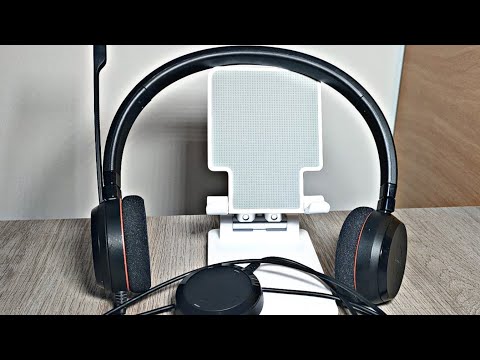
The Jabra Evolve 20SE UC Stereo keeps its design simple: two compact, on-ear earcups joined by an adjustable headband. Its foam cushions sit on the ears rather than enclosing them, so the headset stays fairly light and doesn’t feel bulky at a desk. The trade-off is that you may notice pressure on your ears sooner than with larger over-ear headphones, especially during a long run of back-to-back calls.
The headband adjusts easily to fit different head sizes, and the headset’s mostly plastic construction keeps weight down. The foam ear pads are comfortable for typical work sessions, though they offer little isolation from office chatter. If you wear glasses, the cushion can press the arms against your temples; shifting the headset slightly or loosening the headband may help.
For a work-from-home setup, its slim shape is easy to leave beside a laptop or tuck into a desk drawer. It feels practical rather than premium, but the lightweight wired headset design suits everyday office wear without adding much bulk.
Audio and Microphone Performance
The Jabra Evolve 20SE UC Stereo is tuned for clear speech on work calls, not big, bass-heavy sound. Voices come through cleanly enough to catch quick comments and names, and the stereo drivers make longer meetings easier to follow than a single-ear headset. The sound is fairly restrained, though: music and video are fine for a break, but they lack the depth and punch you’d want from dedicated listening headphones.
Its noise-cancelling microphone helps reduce steady background sounds such as a fan or the soft clatter of typing. That can make a difference on a call from a shared desk, where your voice should stay more prominent than those small distractions. It isn’t a magic mute button, however; a nearby conversation or other loud noise may still reach the person on the other end. The microphone’s focus is call clarity, rather than making your voice sound especially rich or studio-like.
For everyday video meetings, customer calls, and online training, the balance makes sense: speech is easy to understand without needing to turn the volume up much. Just don’t expect strong bass, immersive music playback, or active noise cancellation—the headset’s strengths are straightforward voice communication and a mic designed to keep routine office noise from taking over.
Connectivity and Call Controls
The Jabra Evolve 20SE UC Stereo connects to a computer through its attached USB-A cable, so there’s no Bluetooth pairing or separate audio adapter to manage. Plug it into a USB-A port and it’s ready for calls on a compatible computer. That’s handy when you move between a desk and a meeting room: unplugging it is simpler than leaving a wireless headset paired to the wrong device.
The inline controller puts the everyday call functions within easy reach. You can adjust volume, mute the microphone, and answer or end a call without reaching for the softphone on screen. During a busy workday, that mute button is especially useful when a delivery arrives or someone asks you a quick question nearby.
- USB-A connection: wired connection to a computer, with no charging or Bluetooth setup.
- Inline call controls: volume, mute, and call answer/end functions.
- UC use: works with leading unified communications platforms, though exact button behavior can depend on the calling app.
One limitation: the cable keeps you tethered to the computer, and the USB-A plug may need an adapter on a laptop with USB-C-only ports. For a straightforward wired USB headset for computer calls, though, its controls are practical and quick to learn.
UC Compatibility and Setup
The Jabra Evolve 20SE UC Stereo is designed for plug-and-play use with common unified communications (UC) apps. Connect its USB cable to a computer and it should be ready for calls in services such as Zoom, Google Meet and Cisco Webex, without a separate audio driver. The exact call-control support can vary by app, but basic headset audio usually works as soon as the computer recognizes it.
For a smoother setup, select the headset as both the speaker and microphone in your meeting app’s audio settings. This is handy on a shared office computer, where Windows or macOS may otherwise send sound to built-in speakers while picking up voice through the laptop mic. The inline controller gives you quick access to call functions such as mute and volume; supported answer and end-call controls depend on the UC platform.
It’s a practical choice for a desk-based USB headset for video calls, especially if you move between meetings on different platforms. Just check the connector before ordering: this model is commonly sold with USB-A, while some headset ranges also offer USB-C versions. If your laptop only has USB-C ports, you may need an adapter.
Everyday Use and Durability
For a wired office headset for daily calls, the main everyday advantage is simple: there’s no battery to charge, and the USB connection keeps it ready for the next meeting. The cable is about 2.1 metres long, which gives you room to shift in your chair or reach for a notebook without tugging the headset off your head. The inline control also means you can adjust call settings without reaching for your computer.
Built for desk use, not rough handling
The Jabra Evolve 20SE UC Stereo suits a home-office desk or shared work station better than a commute. Its long cable can catch on a chair arm or get pulled when you stand up, so unplugging it before moving away is a good habit. The headset folds flat for storage, but it isn’t a rugged travel model, and the cable is the part most likely to take wear over time. Coil it loosely rather than wrapping it tightly around the earcups, and keep it out of a crowded laptop bag.
Because it’s a USB headset with no wireless battery, there’s little upkeep beyond keeping the cable and ear cushions clean. That makes it a practical choice for regular desk work, especially in an office where the headset gets used for several short calls throughout the day. It’s best treated as dependable work equipment, not as a headset to toss around or take everywhere.
Competitor comparison
The Jabra Evolve 20SE UC Stereo sits between basic USB call headsets and pricier office models. Its appeal is less about extras and more about having a headset built for regular meetings, with a wired connection that avoids charging and Bluetooth pairing.
| Headset | Where it has the edge | Trade-off |
|---|---|---|
| Jabra Evolve 20SE UC Stereo | UC-focused design and a practical inline call controller | Wired USB connection; no wireless option |
| Logitech H390 | A straightforward choice for occasional video calls and general computer use | Less focused on unified communications features |
| Poly Blackwire 3220 | Often a better fit if you want a more business-oriented wired headset range, including different connection options by model | Check the exact version, since ports and included accessories can vary |
How it compares for everyday office calls
Against the Logitech H390, the Jabra feels like the more deliberate choice for a desk where calls are part of the daily routine. The H390 can make sense for a student joining a weekly lecture or someone who just needs a low-fuss USB headset. The Jabra’s UC focus is more useful for people switching between work calls and collaboration apps throughout the day.
The Poly Blackwire 3220 is the closer rival for office use. It’s worth comparing if you want a wired headset from a business-focused line, but check whether the specific version has the connector you need. For example, a laptop with only USB-C ports may require an adapter for a USB-A headset. That small detail can matter more than a minor difference in sound during a long run of meetings.
For a wired USB headset for Teams and other UC calls, the Evolve 20SE is a sensible middle ground: more work-focused than a basic computer headset, but without the cost or upkeep of a wireless model. Choose a competitor instead if you need Bluetooth freedom or prefer a different port setup; otherwise, its straightforward office-first approach is the main advantage.
Conclusion
The Jabra Evolve 20SE UC Stereo makes the most sense as a wired USB headset for calls, online meetings and focused office work. It keeps the setup simple: plug it in, join a meeting and use the inline controls to mute or adjust volume. For someone who spends the morning moving between Teams calls and a customer-support queue, that straightforward routine can be more useful than wireless features they may never use.
Its limits are just as clear. The cable keeps you close to your computer, and the on-ear design may feel less comfortable over a long stretch than a roomier, higher-priced headset. Still, for buyers searching for an affordable stereo headset with a noise-cancelling microphone for everyday business calls, it’s a sensible, no-fuss choice. Choose it for dependable wired call handling—not for music-first listening or freedom to wander around the room.
Pros & cons
Pros
- Clear speech for calls
- Mic reduces steady background noise
- Convenient inline call controls
- Plug-and-play; no battery to charge
- Lightweight stereo design
Cons
- Wired cable limits movement
- On-ear fit may press during long use
- Music lacks bass and depth
- USB-A may need an adapter
Frequently Asked Questions
To set up your Jabra Evolve 20SE UC Stereo headset with Zoom, simply plug it into your computer via USB. Then, select the headset as your audio device in Zoom settings. This ensures seamless integration and high-quality audio for your calls.
The Jabra Evolve 20SE UC Stereo headset does not support Bluetooth connectivity. It connects via USB, providing easy plug-and-play functionality with computers.
The Jabra Evolve 20SE UC Stereo headset features a microphone with a frequency range of 100 Hz to 10 kHz, ensuring clear and crisp voice quality during calls.
To update the firmware on your Jabra Evolve 20SE UC Stereo headset, use the Jabra Direct software. This tool allows you to easily manage and update your device's firmware.
Yes, the Jabra Evolve 20SE UC Stereo headset is compatible with Microsoft Teams. It is certified for seamless integration, providing a professional communication experience.
The Jabra Evolve 20SE UC Stereo headset offers passive noise cancellation through its ear cushions, which help reduce high-frequency sounds. Additionally, it features a noise-canceling microphone to eliminate background noise.
The Jabra Evolve 20SE UC Stereo headset has a speaker frequency range of 150 Hz to 7 kHz, providing clear sound for both calls and music.
The Jabra Evolve 20SE UC Stereo headset typically comes with a 2-year warranty, ensuring protection against defects for an extended period.
Yes, the Jabra Evolve 20SE UC Stereo headset is compatible with both USB-A and USB-C devices, making it versatile for use across different platforms.
The Jabra Evolve 20SE UC Stereo headset does not specifically mention a busy light feature in its standard specifications. However, some variants may include this feature, so it's best to check the specific model details.
Important
Before buying any product, check all details of this product on the website or in the store where you purchase it. Aspects and specifications mentioned in the text above might differ.

Written by Floris Dampstra
Floris Dampstra is a renowned expert in evaluating the latest technology products, with a particular focus on headphones, media players, and PC speakers. Hailing from Amstelveen, The Netherlands, his passion for music and technology has driven a successful career where he combines his love for audio equipment with his writing skills. Floris's reviews are known for their thoroughness, unbiased nature, and engaging style, making him a trusted voice in the tech community.
Beyond his writing, Floris is an avid music enthusiast and amateur musician, which gives him a unique perspective when reviewing audio equipment. His musical background allows him to assess products based on both technical specifications and sound quality. When not exploring the latest tech, Floris enjoys hiking and exploring national parks across Europe, often drawing inspiration for his writing from these adventures. His honest and insightful reviews help consumers make informed decisions and encourage manufacturers to innovate, making his work a valuable resource for anyone interested in audio technology.
Read more about FlorisWhere to buy
More Jabra reviews
Videos
-

-
 🎧 Jabra Evolve 20 Review || Perfect Headphones For Office Meetings 🔥Royal Tech Reviews
-

-
 Jabra Evolve 20 Review - Low Price Big Performance?Headset Advisor
-
-