-
LatestThe best Speaker of 2026
-
 Ultimate Ears Megaboom 4 Rugged speaker with 360° sound and deep bass.
-
 Ultimate Ears Boom 4 Portable speaker: 360° sound, durable, perfect for adventures.
-
 Ultimate Ears Wonderboom 4 Portable speaker with style, durability, and great sound.
-
 Turtlebox Ranger Rugged outdoor speaker with powerful, clear sound.
-
 House of Marley Get Together 3 Eco-friendly speaker with rich sound and stylish design.
-
 Turtlebox Original Gen 3 Rugged, portable speaker with powerful sound and durability.
-
-
LatestThe best Speaker of 2026
-
 Onkyo GX-10DB Compact speakers with premium sound and versatile connectivity.
-
 Onkyo GX-30ARC Compact speakers delivering impressive sound and sleek design.
-
 Audioengine HD6 HiFi speakers for rich sound and seamless connectivity.
-
 Mackie CR8BT Premium sound quality with Bluetooth convenience.
-
 Mackie CR5BT Affordable studio monitors with Bluetooth connectivity, great sound.
-
 KEF LSX II LT Compact powered speakers with streaming and HDMI ARC
-
-
LatestThe best Speaker of 2026
-
 Yamaha NS-F 51 Smooth, affordable floorstanders for music and movie nights
-
 Q Acoustics 5040 Floorstanders deliver clear vocals, controlled bass, spacious sound.
-
 Q Acoustics 3050i Hifi Warm, room-filling floorstanders for music and movie nights.
-
 Q Acoustics M40 Room-filling stereo sound with simple all-in-one connectivity.
-
 Polk Audio T50 Warm, affordable towers for music and home theater
-
 KEF Q550 Slim towers, clear vocals, spacious imaging, controlled bass.
-
-
LatestThe best Speaker of 2026
-
 Logitech Z207 2.0 Affordable PC speakers with versatile connectivity options.
-
 Edifier G2000 Compact speakers with powerful sound, perfect for desks.
-
 Edifier R1855DB Fuller desktop sound with flexible wired and wireless connectivity.
-
 Edifier R1280T Affordable powered speakers offer warm, clear everyday sound.
-
 Audioengine A2+ Compact powered speakers deliver clear, flexible desktop sound.
-
 Logitech Z313 Compact 2.1 desktop speakers deliver fuller everyday audio.
-
-
LatestThe best Headphone of 2026
-
 Sony 1000X THE COLLEXION Zwart Sleek headphones with immersive sound and adaptive noise cancellation.
-
 Bose QuietComfort Ultra Headphones (Gen 2) Immersive sound, top-notch noise cancellation, ultimate comfort.
-
 Sony WH-1000XM6 High-performance headphones with exceptional sound and features.
-
 JBL Tour One M3 Smart TX Premium noise-cancelling headphones with a travel-ready audio transmitter
-
 Cleer Audio Enduro ANC Affordable headphones with cancellation and marathon battery life
-
 Cleer Audio Alpha Detailed sound, strong noise cancellation, and all-day battery life.
-
-
LatestThe best Headphone of 2026
-
 Jabra Evolve 20SE UC Stereo Lightweight wired headset for clear everyday office calls
-
 Jabra Evolve 40 UC Wired headset delivers clear calls and convenient controls
-
 Philips TAH4205 Compact wireless headphones with punchy bass and quick charging
-
 Jabra Evolve2 65 Flex MS Foldable Teams headset for clear, portable hybrid-work calls.
-
 JBL JR310BT Kid-friendly wireless audio with an 85 dB limit
-
 Sony WH-CH520 Lightweight headphones, long battery life, effortless pairing.
-
-
LatestThe best Headphone of 2026
-
 Cleer Audio ARC 3 Open-ear comfort, rich features, everyday awareness.
-
 Samsung Buds FE Affordable everyday earbuds with ANC and a secure fit
-
 Sennheiser Momentum Sport Workout earbuds with heart-rate tracking and punchy sound
-
 Sony LinkBuds Fit Comfortable, secure earbuds for commutes and workouts.
-
 JBL Live Buds 3 Feature-rich earbuds with touchscreen case and customizable sound.
-
 Bowers & Wilkins Pi8 Premium earbuds offer detailed sound and travel-ready versatility
-
-
LatestThe best Headphone of 2026
-
 HyperX Cloud Alpha Wireless Wireless headphones: immersive sound, long-lasting battery life.
-
 Razer Kraken V4 Immersive gaming headset with comfort and sound quality.
-
 Turtle Beach Stealth 700 GEN3 Flexible gaming audio, Bluetooth, and exceptional battery endurance.
-
 Logitech G535 Lightspeed Wireless Lightweight comfort and reliable PC, PlayStation gaming audio
-
 Corsair Void RGB Elite Wireless Comfortable PC gaming headset with punchy audio
-
 Corsair HS80 RGB Wireless Comfortable gaming headset with clear audio and microphone
-
-
LatestThe best Home audio system of 2026
-
 Sony Bravia Theatre Bar 8 Premium Dolby Atmos sound with a tidy, expandable single-bar design.
-
 TCL S45H 2.0 Compact budget soundbar boosts dialogue with virtual surround.
-
 TCL S55H 2.1 Compact soundbar delivers clearer dialogue, cinematic sound, and wireless bass.
-
 TCL Q85H Immersive Dolby Atmos cinema sound, without receiver hassle.
-
 Harman Kardon Enchant 1100 Premium soundbar brings immersive cinema and clear dialogue
-
 Harman Kardon Enchant 900 Compact Atmos soundbar with clear dialogue and spacious sound.
-
-
LatestThe best Home audio system of 2026
-
 Google TV Streamer 4K Polished streaming and smart-home hub for everyday viewing
-
 Apple TV 4K (Wi-Fi) Premium streaming with polished menus and seamless integration.
-
 Nvidia Shield TV Pro Versatile 4K streamer for local media and gaming
-
-
LatestThe best Home audio system of 2026
-
 Pioneer VSX-LX305 Immersive nine-channel home theater with Dirac Live correction.
-
 Denon AVC-X3800H Expandable home theater power with Atmos and gaming connectivity.
-
 Pioneer VSX-LX505 Flexible Atmos receiver with Dirac Live, gaming support
-
 JBL MA510 Straightforward 5.2-channel home theater with modern gaming connectivity.
-
 JBL MA310 Straightforward 5.2-channel surround sound for 4K home theaters
-
 Denon AVR-S970H Flexible 7.2-channel receiver for immersive, modern home theaters
-
-
LatestThe best Home audio system of 2026
-
 Denon PMA-1700NE Versatile stereo amp for vinyl and digital music
-
 Pioneer A-40AE Balanced stereo sound, versatile analog and digital connections.
-
 Audiolab 6000A Versatile stereo amplification with clear sound and connectivity
-
 Denon PMA-900HNE Streaming stereo amplifier for vinyl, TV, and playlists
-
 LEAK Stereo 130 Versatile, stylish amplifier for vinyl, digital audio, and Bluetooth.
-
 Yamaha A-S701 Powerful, versatile stereo amplification for traditional home hi-fi.
-
-
LatestThe best Home audio system of 2026
-
 Mackie CR8S Enhance audio with deep, rich bass performance.
-
 Audioengine S8 Compact powered subwoofer adds balanced bass to small stereo setups.
-
 KEF Kube 12 MIE Active Subwoofer Controlled, room-filling bass for music and cinematic impact.
-
 Klipsch R-12SW Powerful, room-filling bass for movies and music.
-
 Klipsch R-121SW Powerful, room-filling bass for movies and music.
-
 Bose Bass Module 500 Compact subwoofer adds fuller sound to compatible soundbars.
-
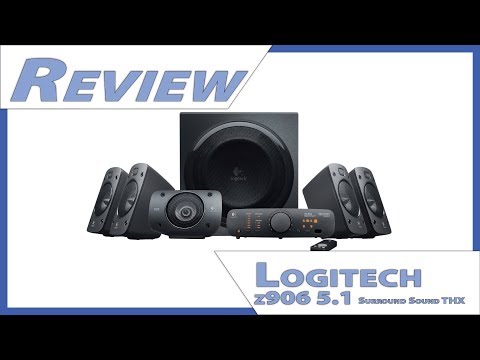
Logitech Z906 5.1 Surround Sound review
Logitech Z906 review: See how its THX-certified 5.1 surround sound, powerful bass and versatile inputs perform for PC gaming, movies and music.
check best price


 2023-11-09
- By Marije Strooberg
Summary / TL;DR

The Logitech Z906 is a wired 5.1 speaker system suited to PC gaming, films and TV in a room with space for five satellites and a substantial subwoofer. It delivers clear dialogue, distinct surround effects and adjustable, impactful bass, with Dolby Digital and DTS decoding. Its multiple optical, coaxial, RCA and analog inputs allow several devices to remain connected, while a control console and remote handle everyday adjustments.
Trade-offs include plastic satellite enclosures, a tangle of speaker wires and no HDMI, eARC or wireless audio. Some connections, such as an optical cable, may need to be purchased separately, and surround performance depends on compatible audio output and sensible speaker placement. The small satellites lack the fullness of larger speakers, and the subwoofer can sound boomy if set too high. The Z906 is a capable option for buyers prioritizing genuine surround sound over a compact, minimalist setup.
If you like this review, you might also like our review on the Logitech Z207 2.0 or Logitech Z623 2.1 Speakersystem.
Where to buy
 Best offers of the Logitech Z906 5.1 Surround Sound at Amazon.com
Want to help us grow? When you purchase items through the above links we receive a small commission.
Introduction
The Logitech Z906 5.1 Surround Sound is a proper home-theater speaker system for anyone who wants more than a pair of small desktop speakers. It combines five satellite speakers with a subwoofer and carries THX certification, making it a familiar choice for PC gaming, films, and TV audio in a modest-sized room.
Its appeal is straightforward: one system can serve a gaming PC, a console, and a TV, rather than leaving you to juggle separate speakers for each. Picture a desk setup where you switch from a late-night game to a film on the same display; the Z906 is built for that kind of shared use. Just keep in mind that a 5.1 system needs room for several speakers and cables, so it suits a permanent setup better than a tidy, minimal desk.
Related reviews


Design and Build Quality
The Logitech Z906’s design is all business: matte-black cabinets, squared-off edges and no flashy lighting. That makes the speakers easy to blend into a desk setup or living room, though the plastic satellite enclosures feel more practical than premium. Their compact size is useful on a crowded desk, and the matching center speaker can sit neatly beneath a monitor or TV.
The subwoofer is the part that needs a proper spot. At roughly 28 × 29 × 32 cm and 8.5 kg, it’s a substantial box, not something most people will want to perch on a small shelf. Its black wood cabinet feels sturdier than the satellites, and its plain finish is easy to tuck beside a TV stand or under a desk. Just leave room around it rather than wedging it into a tight corner.
| Component | Approximate dimensions | Approximate weight |
|---|---|---|
| Satellite speakers | 10 × 16.6 × 9.4 cm each | 0.8 kg each |
| Center speaker | 16.6 × 10 × 9.4 cm | 0.8 kg |
| Subwoofer | 28.1 × 29.3 × 31.9 cm | 8.5 kg |
Each satellite has a wall-mounting point, handy if you’d rather keep speaker stands and desk space clear. The small enclosures are also easy to position on shelves, although their lightweight plastic construction doesn’t have the reassuring heft of a wood-cabinet speaker. Overall, the build is sturdy enough for everyday home use, with a design that prioritizes compact placement over decorative detail.
What's in the Box
The box includes the five satellite speakers, a powered subwoofer, the control console, a wireless remote, three AAA batteries, a six-channel direct cable, and user documentation. The speaker wires are attached to the satellites, so there’s no need to buy separate cables just to connect the speakers to the subwoofer.
- Five satellite speakers: Four compact speakers for the front and rear channels, plus a center speaker for dialogue.
- Powered subwoofer: The largest item in the package, so check your desk or floor space before unboxing.
- Control console and remote: The console handles source and speaker controls; the remote gives you a way to adjust settings from across the room.
- Six-channel direct cable: Useful for connecting a compatible PC with separate surround-audio outputs.
- Three AAA batteries and documentation: The batteries mean the remote is ready to use without an extra trip to the store.
One small omission: the package doesn’t include every cable you might need for every setup. For example, an optical cable isn’t supplied, so you’ll need to provide one if that’s how you plan to connect your PC, console, or TV. Check the inputs on your device before buying; the included six-channel cable is meant for a specific type of connection, not a universal replacement for optical or other audio cables.
Setup and Connectivity
Plan the cable routes before placing the speakers: the subwoofer is the hub for the wired connections, so each satellite needs to reach it. The Logitech Z906 5.1 Surround Sound uses spring-clip terminals for the speaker wires. That keeps connections simple, though setting up rear speakers across a room can take more planning than a system with wireless rears.
For a PC, you can connect through three 3.5 mm analog jacks for discrete 5.1-channel audio, provided the computer’s sound card supports it. A single optical cable is neater, but check your PC’s audio settings: optical commonly sends surround sound through Dolby Digital or DTS encoding rather than uncompressed multichannel PCM. The system also has two optical inputs, one coaxial digital input, and stereo RCA inputs, which makes it easy to leave a console or TV connected alongside a computer.
| Connection | Useful for |
|---|---|
| Three 3.5 mm inputs | Direct 5.1 analog output from a compatible PC sound card |
| Two optical and one coaxial input | Digital audio from a PC, TV, console, or other compatible device |
| Stereo RCA input | Connecting a basic stereo source |
One limitation is the lack of HDMI input. If your PC or TV only has HDMI audio, you’ll need another audio output or a separate converter. Once everything is wired, select the relevant input on the control console or remote; switching between a PC’s analog connection and an optical-connected console is straightforward.
Sound Quality and Surround Performance
The Logitech Z906 delivers a convincing 5.1 surround sound presentation, with clear separation between its five satellite speakers and a subwoofer that adds real weight to the mix. Its 500 watts RMS gives it plenty of headroom for a desktop or modest living room, though the sound stays more enjoyable when you resist the urge to push the volume to its limit.
Clear dialogue and distinct channels
Voices come through the center channel with good focus, so dialogue is easier to follow while other sounds move around the room. In a well-mixed surround track, a sound can shift from the front speakers to the rears without turning into a vague wash. That separation makes effects feel placed around you rather than simply louder on one side.
The small satellite speakers do a good job with speech and effects, but they have less body in the lower midrange than larger bookshelf speakers. A door slam or a low musical note can sound thinner through a satellite than it would through a full-size speaker. The subwoofer fills in much of that weight, and its level can be adjusted independently to keep bass from overwhelming voices.
Subwoofer impact and surround balance
The 8-inch subwoofer reaches down to add a satisfying thump to explosions, deep drums, and other bass-heavy effects. It can make a game or film feel more physical, but its output may sound boomy if the room has strong bass buildup or the sub is set too high. A small level adjustment can make a noticeable difference.
The Z906 supports Dolby Digital and DTS decoding and carries THX certification. Those credentials suit its main strength: reproducing properly encoded surround material with a clear front stage and audible rear-channel effects. The result depends on the source, though. Stereo audio does not contain dedicated rear-channel information, so simulated surround can sound less precise than a native 5.1 mix.
Overall, this is a capable PC speaker system for 5.1 surround sound, especially for listeners who want distinct channel separation and impactful bass without building a receiver-and-speaker setup. Its satellites cannot match larger speakers for fullness, but the center-channel clarity and adjustable subwoofer help it deliver a lively, well-defined soundstage.
Controls and Ease of Use
The wired control console keeps everyday adjustments close at hand. Its large volume dial is easy to find by touch, while separate buttons handle power, input selection and surround effects. A row of lights shows which speakers are active, so you can tell at a glance whether the system is using stereo or a surround mode.
The included remote is handy when the speakers are across the room. You can change the volume, mute playback, switch inputs and adjust the subwoofer or individual speaker levels without getting up. That last option is useful for small room tweaks: for example, you can lower the rear speakers during a late-night film without changing the overall volume. The remote uses infrared, though, so it needs a clear path to the control console.
There is a little more button-pressing involved than with a simple PC speaker set. Changing surround modes or fine-tuning speaker levels takes a moment to learn, and the compact remote buttons aren’t as comfortable to use in a dark room. Still, the main controls are straightforward once you’ve used them a few times, and the console makes PC speaker volume and surround settings easy to adjust from your desk.
Performance for Movies
For movies, the Logitech Z906 makes a strong case for a proper 5.1 surround sound system for PC and TV. A clear center channel keeps speech anchored to the screen, while the rear speakers can place rain, crowd noise, or a passing car behind you instead of blending everything into the front channels. In a thriller, that shift is easy to appreciate: quiet dialogue stays understandable, then a sudden sound from the rear channel gives the scene a sharper sense of space.
The system supports Dolby Digital and DTS decoding, so compatible movie tracks can play in their intended surround format. It also carries THX certification, though that label doesn’t guarantee the same result in every room; speaker placement and your listening distance still matter. The 165-watt RMS subwoofer adds weight to explosions and low rumbles, but its level is adjustable, which helps keep action scenes from drowning out dialogue in a smaller room.
There is one practical catch for a modern TV setup: the Z906 has optical and coaxial digital inputs, but no HDMI or eARC. Optical works well for many televisions, but check that your TV can send Dolby Digital 5.1 over its optical output. Otherwise, a movie may play in stereo or require a different connection. It also won’t reproduce Dolby Atmos or DTS:X height effects, so overhead sounds in newer soundtracks won’t come through as intended.
At sensible volume, it makes a film night feel fuller without needing a receiver and separate amplifier. Just give the rear speakers room behind or beside your seating position; placed too close to the couch, their effects can sound more distracting than immersive.
Music
For music, the Logitech Z906 works best when you treat it as a compact stereo system with a subwoofer, rather than expecting every song to use all six speakers. In 2.1 mode, vocals and instruments stay anchored to the front while the subwoofer adds weight underneath. A bass line or kick drum has satisfying punch, and turning the subwoofer level down a notch can keep that low end from overpowering a quieter track.
That balance suits pop, hip-hop, electronic music, and rock especially well. On acoustic songs, vocals come through clearly, though the small satellite drivers don’t offer the airy detail or fine separation you’ll hear from a good pair of stereo bookshelf speakers. Busy mixes can sound a little crowded, too, particularly at higher volume.
The control console offers other listening modes, including 4.1-channel playback and a surround-style mode that spreads stereo music across more speakers. It can make a playlist feel bigger in a room, but it won’t add real surround information to a standard stereo recording. For natural-sounding music, 2.1 is usually the safer pick; use the wider modes when you want fuller room coverage rather than precise stereo imaging.
and Gaming
For PC gaming, the main appeal is real 5.1-channel positional audio, not a software effect pretending to put sounds behind you. In games with native surround support, footsteps, passing vehicles, and distant gunfire can come through the rear speakers, making it easier to place action around the room. The effect is especially clear in a shooter: a reload or footstep behind your character sounds distinct from movement on screen, provided the speakers are positioned correctly and the game is set to output 5.1.
The subwoofer gives explosions and engine noise satisfying weight, but it can be a bit much in a small room or late at night. You can lower the bass level without changing the game’s overall volume, which helps keep dialogue and quieter cues audible. For PC surround sound, use the six-channel direct connection when your computer has the matching outputs; with a console, check that the game and audio settings send a supported Dolby Digital or DTS signal over a digital connection. A stereo signal won’t give you the same precise rear-channel cues.
There’s a practical trade-off: this setup takes space, and the rear speakers need to sit behind you to earn their place. Still, for couch gaming or a desk with room for proper speaker placement, it delivers a more convincing 5.1 gaming audio setup than compact desktop speakers, especially in games where direction and distance matter.
Competitor comparison
Against other PC speaker systems, the Logitech Z906’s main advantage is straightforward: it gives you five satellite speakers and a subwoofer, rather than asking two desktop speakers to imitate surround sound. That distinction matters if you watch films from a couch or play games where rear audio helps locate movement. It also takes up more room and needs more speaker cables than most 2.1 alternatives.
| System | Best fit | Main trade-off |
|---|---|---|
| Logitech Z906 | True 5.1 playback, multiple devices, and a separate surround decoder | More speakers and wires to place around the room |
| Logitech Z623 | A simpler 2.1 setup for a desk, with a subwoofer for games and music | No dedicated rear speakers for genuine 5.1 surround |
| Klipsch ProMedia 2.1 | Buyers who want a compact two-speaker desktop system with a sub | Less suited to a room-based surround setup |
| Edifier S350DB | A 2.1 speaker system with wireless Bluetooth as well as wired inputs | Its two-speaker layout cannot place sound behind you like a 5.1 system |
The Z623 and ProMedia 2.1 are easier fits when both speakers sit beside a monitor; there’s no need to run cables behind a desk or across a living room. But virtual surround from a 2.1 system is not the same as having rear speakers play distinct audio channels. For a game that sends footsteps or vehicle noise to the back channels, the Z906 has a practical advantage—provided your PC or console is outputting compatible surround audio.
The Edifier S350DB makes more sense if Bluetooth playback and a tidy stereo setup matter more than rear-channel effects. The Z906, by comparison, is aimed at people who want 5.1 PC speakers with Dolby Digital and DTS decoding and several ways to connect devices. Its THX certification and rated 500 watts RMS also set it apart from smaller desktop kits, though those numbers don’t guarantee better sound in every room or at every volume. For a compact desk, a 2.1 system is often the less fussy choice; for a TV-and-PC setup where proper surround is the priority, the Z906 is the more capable option.
Conclusion
The Logitech Z906 still makes sense as a compact, all-in-one 5.1 speaker system for a PC or TV setup. Its 500 watts RMS and THX certification give it more than enough muscle for a movie night, while the separate speakers create a proper surround layout without the cost or complexity of a receiver and passive speakers.
Its main drawback is its age: there’s no HDMI or built-in wireless audio, so a newer TV or console may need an optical connection or an adapter. It also takes a bit of room to place five speakers sensibly. In a small apartment, you may find yourself turning the subwoofer down after dark; in a dedicated desk or media room, that same setup can make games and films feel much bigger than a standard stereo pair.
For buyers seeking powerful PC speakers with 5.1 surround sound, straightforward wired connections, and a strong price-to-performance ratio, it remains a capable choice. Just make sure your devices support the connections you plan to use, and that you have space for a true surround setup.
Pros & cons
Pros
- Convincing true 5.1 surround sound
- Clear dialogue and channel separation
- Powerful, adjustable subwoofer
- Multiple inputs for PC, TV, and console
- Remote and control console included
Cons
- No HDMI or built-in wireless audio
- Many cables and speakers need space
- Satellites lack fullness of larger speakers
- Optical cable not included
Frequently Asked Questions
The Logitech Z906 supports multiple audio inputs including 6-channel direct input, stereo RCA, digital optical (two inputs), and coaxial input. It also has a 3.5mm auxiliary input and a headphone jack on the control console, making it compatible with a wide range of devices such as PCs, TVs, and gaming consoles.
To connect your Logitech Z906 to a TV, use the TV's audio output port such as RCA, optical, or coaxial. Connect the corresponding cable from the TV to the matching input on the Z906 control console. Then power on the system, select the correct input using the remote or console, and adjust the volume as needed.
Yes, the Logitech Z906 5.1 Surround Sound system is THX certified, ensuring it meets strict performance standards for authentic cinematic sound quality.
The Logitech Z906 delivers a total of 500 watts RMS continuous power with a peak output of 1000 watts. The subwoofer provides 165 watts, and each of the five satellite speakers delivers 67 watts.
Yes, the Logitech Z906 has a headphone jack on the side of the control console. When headphones are plugged in, all other speaker outputs are automatically muted for private listening.
Using the control console or remote, you can select the level control to adjust the volume of the subwoofer, rear satellites, center channel, or main volume independently, allowing you to tailor the surround sound experience.
Yes, the Logitech Z906 is compatible with gaming consoles. It supports multiple inputs such as optical and coaxial, commonly found on consoles, and provides immersive 5.1 surround sound for gaming.
Yes, the Logitech Z906 supports Dolby Digital and DTS decoding, allowing it to accurately reproduce surround sound from movies, games, and music encoded in these formats.
Yes, the Logitech Z906 includes wall-mountable satellite speakers and a wall-mountable center channel speaker, providing flexible placement options to optimize your surround sound setup.
To reset the Logitech Z906, turn off the system using the power button on the control console. Then press and hold the Input button for eight seconds while the system is off. You will hear a popping sound and see lights flash on the console, indicating the reset is complete.
Important
Before buying any product, check all details of this product on the website or in the store where you purchase it. Aspects and specifications mentioned in the text above might differ.

Written by Marije Strooberg
Marije Strooberg, based in Groningen, The Netherlands, is a renowned expert in audio product reviews, specializing in mobile, HiFi, and PC speakers. With nine years of experience, her insightful critiques are trusted by readers seeking informed purchasing decisions. Marije's self-taught background and passion for music and technology enable her to communicate complex audio concepts with clarity, making her a respected voice in the sound technology industry.
Her reviews are praised for their balance of technical detail and accessible language, often including product comparisons and practical advice. Beyond her professional work, Marije enjoys exploring new cultures and testing portable speakers in diverse environments, infusing her writing with personal experiences. Committed to sustainability, she also volunteers with local organizations to promote eco-friendly consumer habits and highlights environmentally responsible audio companies in her reviews.
Read more about MarijeWhere to buy
More Logitech reviews
Videos
-
 Logitech Z906: 15 years with my favorite 5.1 speaker setup2-Minute Reviews
-

-
 Should You Still Buy the Logitech Z906 in 2025?TheReviewist
-

-
 Logitech Z906: My 10-year review of this 5.1 speaker system2-Minute Reviews
-